Notification Settings
Last updated: October 14, 2025
Overview
When using the nodaFi app, you can set up when and how you receive notifications. You can receive email notifications or push notifications on the device your app is installed on.
In this article, we’ll go over how to manage both types of notifications in the nodaFi app.
Note: For more information on the app, see the articles Setting Up the Mobile App and Log into the App.
Email Notifications
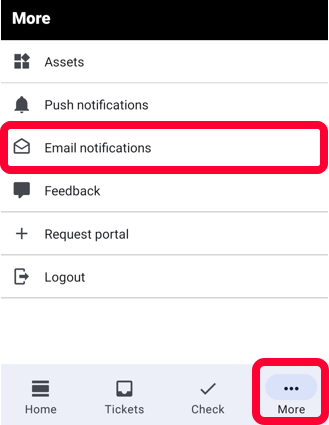
Click More in the bottom right and Email notifications.
All of the email notification options will be displayed below. To enable a notification option, toggle the switch right. To disable an option, toggle the switch left.
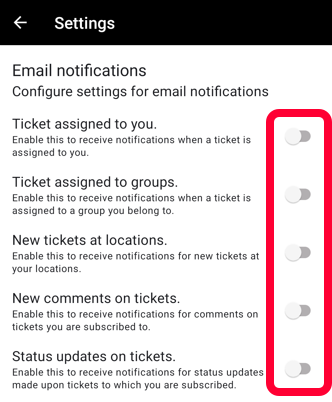
Your changes will automatically save.
Push Notifications
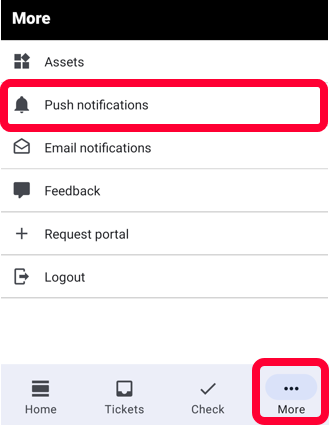
Click More in the bottom right and then Push Notifications.
All of the push notification options will be displayed below. To enable a notification option, toggle the switch right. To disable an option, toggle the switch left.
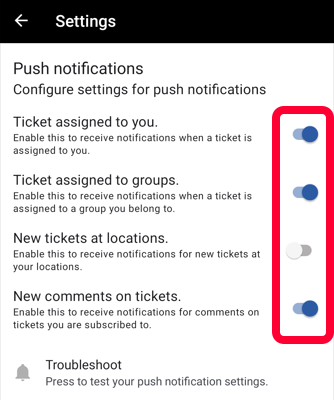
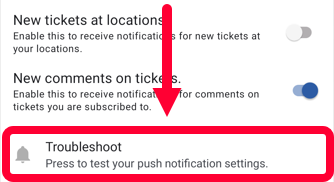
When you’re done, you can test your notifications by clicking Troubleshoot at the bottom. A sample push notification will pop up on your device.
Your changes will automatically save.